Tune performance
This page describes factors that can affect the performance of migration jobs being carried out using yb-voyager, along with the tuneable parameters you can use to improve performance.
Improve import snapshot performance
There are several factors that slow down data-ingestion performance in any database:
-
Constraint checks. Every insert has to satisfy the constraints (including foreign key constraints, value constraints, and so on) defined on a table, which results in extra processing. In distributed databases, this becomes pronounced as foreign key checks invariably mean talking to peer servers.
-
Trigger actions. If triggers are defined on tables for every insert, then the corresponding trigger action (for each insert) is executed, which slows down ingestion.
yb-voyager improves performance when migrating data into a newly created empty database in several ways:
-
Disables foreign key constraints during data import. However, other constraints like primary key constraints, check constraints, unique key constraints, and so on are not disabled. It's safe to disable some constraint checks as the data is from a reliable source. For maximum throughput, it is also preferable to not follow any order when populating tables.
-
Disables triggers also during the import data phase.
Note
yb-voyager only disables the constraint checks and triggers in the internal sessions it uses to migrate data.
Techniques to improve performance
Use one or more of the following techniques to improve import data performance:
-
Load data in parallel. yb-voyager imports batches from multiple tables at any given time using parallel connections. On YugabyteDB v2.20 and later, yb-voyager adjusts the number of connections based on the resource use (CPU and memory) of the cluster, with the goal of maintaining stability while optimizing CPU.
Available flags:
-
By default, adaptive parallelism operates under moderate thresholds (
--adaptive-parallelism balanced), where Voyager throttles the number of parallel connections if the CPU usage of any node exceeds 80%. To maximize CPU use for faster performance, you can use theaggressiveflag; this is only recommended if you don't have any other running workloads. -
By default, the upper bound for the number of parallel connections is set to half the total number of cores in the YugabyteDB cluster. Use the
--adaptive-parallelism-maxflag to override this value. -
To disable adaptive parallelism and specify a static number of connections, use
--adaptive-parallelism disabled --parallel-jobs N.
-
-
Increase batch size. The default --batch-size is 20000 rows or approximately 200 MB of data, depending on whichever is reached first while preparing the batch. Normally this is considered a good default value. However, if the rows are too small, then you may consider increasing the batch size for greater throughput. Increasing the batch size to a very high value is not recommended as the whole batch is executed in one transaction.
-
Add disks to YugabyteDB servers to reduce disk write contention. YugabyteDB servers can be configured with one or multiple disk volumes to store tablet data. If all tablets are writing to a single disk, write contention can slow down the ingestion speed. Configuring the YB-TServers with multiple disks can reduce disk write contention, thereby increasing throughput. Disks with higher IOPS and better throughput also improve write performance.
-
Enable packed rows to increase the throughput by more than two times. Enable packed rows on the YugabyteDB cluster by setting the YB-TServer flag ysql_enable_packed_row to true. In v2.20.0 and later, packed rows for YSQL is enabled by default for new clusters.
-
Configure the voyager machine's disk with higher IOPS and better throughput to improve the performance of the splitter, which splits the large data file into smaller splits of 20000 rows. Splitter performance depends on the voyager machine's disk.
Improve import CDC streaming performance
During live migration, after importing the snapshot, yb-voyager continuously applies change events captured from your source database. To apply changes quickly, the importer captures every insert, update, and delete in commit order and spreads them across many parallel channels (workers). Events are assigned to channels by hashing a CDC partition key, and choosing that key well is the main lever for streaming throughput on write-heavy workloads.

The router sits between the ordered change stream and the parallel channels. Each channel applies its own events strictly in order. Ordering between channels is not guaranteed, which is why the partition key matters.
Three routing strategies
yb-voyager provides three strategies for routing change events: pk can spread different rows across every channel and relies on conflict detection; table sends a table's events down one channel and does not need conflict detection; and a custom key keeps conflicting events on one channel and can spread the rest.
The following table compares the three routing strategies, how much parallelism you get, and whether conflict detection runs.
| Strategy | Routing rule | Parallelism | Conflict detection | Best for |
|---|---|---|---|---|
pk |
Hash of primary key | Different rows can use every channel | On, guards unique indexes | Most tables; high-throughput tables with few conflicts |
Custom key (cols) |
Hash of specified immutable columns | Distinct key values spread across channels | On, but idle in steady state | Hot tables where conflicting columns are immutable |
table |
Table name | One channel per table | Off | Tables with mutable conflict columns, or expression-based unique indexes |
Set the strategy for every table with --cdc-partition-key. Override it for one table with --cdc-partition-key-overrides.
The global default is --cdc-partition-key auto, which picks pk for most tables, and table when primary key hashing isn't safe.
Live migration with fall-back or fall-forward
--cdc-partition-key and --cdc-partition-key-overrides apply only to import data to target. In live migration with fall-back and live migration with fall-forward, import data to source and import data to source-replica partition every table by table name and turn conflict detection off. Custom keys are neither needed nor accepted on those commands.
How events are partitioned by default
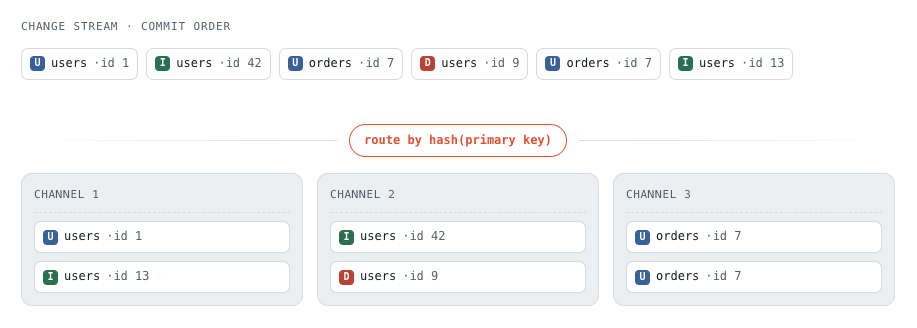
By default (--cdc-partition-key auto), yb-voyager partitions most tables by primary key: every event is routed by a hash of the row's primary key. This means:
- Events for the same row always land on the same channel, so that row's history is applied in commit order.
- Events for different rows can be spread across all channels, so a single busy table can keep every channel working. Parallel channels apply those writes concurrently, and a distributed target like YugabyteDB can take them on many nodes at once.
In the following example, the users table's events are different rows, so they can be spread across channels 1 and 2. The two events on the orders table with id 7 touch the same row, so they hash to the same channel (3) and stay in order.
Tables that can't be partitioned by primary key (when primary key hashing isn't safe) are partitioned by table instead.
Unique key conflict detection
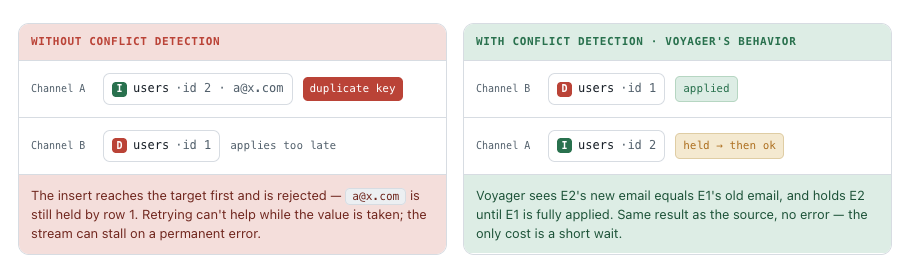
A unique value such as an email can be freed by one row and taken by another. Those events touch different rows, so they can land on different channels, but they still have to be applied in that order. For this reason, yb-voyager runs conflict detection for pk and custom-key tables that have a unique index. It compares unique-key values across in-flight events and, when an incoming event's new value matches an in-flight event's old value, holds the incoming event until the earlier one is fully applied. The result matches the source, at the cost of a short wait.
Consider a users table with primary key id and a unique email. Two changes commit in this order:
- E1 — delete row
id1, which frees the emaila@x.com. - E2 — insert row
id2, reusinga@x.com.
They touch different rows, so under partition-by-primary-key they hash to different channels. In the following illustration, E1 is the delete of id 1 (users · id 1) and E2 is the insert of id 2 (users · id 2) that reuses a@x.com. Without conflict detection, that insert can reach the target first and fail with a duplicate key, because row 1 still holds the email. Conflict detection holds E2 until E1 is fully applied.
When conflict detection becomes a bottleneck
Conflict detection is cheap when conflicts are rare. On some workloads, however, it fires on almost every change and becomes the steady-state path. This is common when a table has one or more unique indexes over columns that see heavy churn of unique values, such as:
-
A delete-then-reinsert pattern that reuses a unique value (an email, external reference, or code is freed by one row and immediately taken by another).
-
An append-only/status-history pattern, where each change appends a new row and a partial unique index marks the single current row per entity:
-- generic append-only status table
CREATE TABLE order_status_history (
    id         bigint PRIMARY KEY, -- what yb-voyager hashes by default
    order_id   bigint,             -- the order this row belongs to
    status     text,               -- placed -> packed -> shipped -> delivered ...
    is_current boolean
);

-- At most one current row per order
CREATE UNIQUE INDEX ON order_status_history (order_id, is_current)
    WHERE is_current;
Every status change emits an update and insert pair on two different rows: the old current row steps down (is_current becomes false) and a new current row takes its place. Because the two rows have different primary keys, they hash to different channels, and the unique index makes them a genuine conflict. As a result, detection holds the insert on every single transition as per the following illustration:
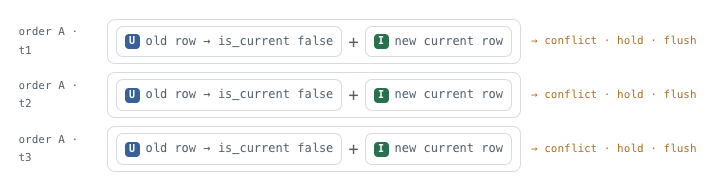
The table then effectively serializes through the conflict machinery: you pay the ordering cost of single-channel apply plus the tracking and cross-channel flushes on top. On a high-transition table, this shows up as slow streaming and growing CDC lag. In the import log, it appears as a stream of lines like the following for the same table:
conflict detected for table "public"."order_status_history", index columns [order_id is_current], ...
waiting for event(vsn=...) to be complete before processing event(vsn=...)
A high volume of these lines for one table is the signal to change that table's partition key.
Partition the hot table by an immutable key column
If the columns responsible for the conflicts are immutable (never changed by an update), use the custom key strategy to route that table's events by those columns instead of by primary key. Every event that could ever collide then shares a channel and applies in commit order, while unrelated rows still spread across all channels. In the status-history example, both halves of every transition share the same order_id.
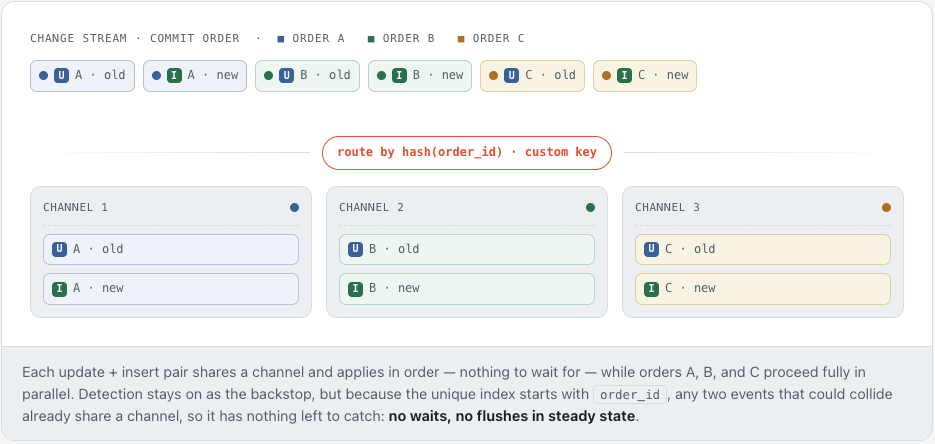
To do this, use --cdc-partition-key-overrides to set a per-table CDC partition key on the import data to target command. For example, to route one hot table by the immutable column order_id, while every other table keeps the default auto, use the following command:
yb-voyager import data to target \
        --cdc-partition-key-overrides 'public.order_status_history:(order_id)'
--cdc-partition-key-overrides supports the same three strategies:
(col1,col2): Partition the table by the values of the given immutable columns (the custom key).pk: Partition by primary key.table: Send all of the table's events to a single channel.
You can pass a semicolon-separated list of schema.table:strategy pairs. Tables not listed keep the global --cdc-partition-key (default auto). For example, the following command partitions one table by a custom key, forces another to a single channel, and leaves the rest on the default:
yb-voyager import data to target \
        --cdc-partition-key-overrides 'public.order_status_history:(order_id);public.audit_log:table'
Choose a good partition key
For a custom key to eliminate conflicts without breaking correctness or throughput, it should satisfy the following:
-
It must be immutable (required for correctness). If an update could change the key column, the same logical row would hash to different channels before and after the change, breaking per-row ordering. Primary keys give this guarantee for free; verify a custom key yourself.
-
It should appear in every unique index on the table (for effectiveness). If the key is one of an index's columns, any two rows that collide on that index share the key, route to the same channel, and apply in order. Covering every unique index this way makes every possible collision intra-channel; missing any index can still collide on that index, and detection will still fire.
For example,
order_idis part of bothUNIQUE (order_id, sort_key)andUNIQUE (order_id, is_current), so partitioning byorder_iddrives conflicts to zero. An uncovered index such asUNIQUE (tracking_code)can still trigger detection.If the key misses a unique index, correctness is still preserved (conflict detection keeps guarding cross-channel events), but detection keeps tripping on that index, and the waits return.
-
High cardinality, not-null, and low-skew (for performance). A table can keep at most as many channels busy as there are distinct key values among the events being applied. Many distinct values spread evenly across channels. Events that share one very common value, or that have a NULL key, all hash to one channel and are applied one after another; the rest of the table can still use the other channels.
Partition by table name
If a table's conflicting columns are not immutable, or you want a quick, blunt fix, partition it by table name instead. With table, all of a table's events go to one channel, so races are impossible by construction and conflict detection is skipped entirely for that table.
- Per table:
--cdc-partition-key-overrides 'public.order_status_history:table' - Globally, for all tables:
--cdc-partition-key table
The trade-off is throughput: a table partitioned by table name is capped at one channel's speed. Prefer a custom immutable key when one exists, and fall back to table only when it doesn't.
Improve export performance
By default, yb-voyager exports four tables at a time. To speed up data export, parallelize the export of data from multiple tables using the --parallel-jobs argument with the export data command to increase the number of jobs. For details about the argument, refer to the arguments table. Setting the value too high can, however, negatively impact performance; so a setting of 4 typically performs well.
If you use BETA_FAST_DATA_EXPORT to accelerate data export, yb-voyager exports only one table at a time and the --parallel-jobs argument is ignored.