Resource Governance EARLY ACCESS
Use Resource Governance to safely consolidate many independent YSQL databases on a single YugabyteDB cluster. Instead of deploying a dedicated cluster for every application, multiple databases share the same infrastructure while remaining logically isolated. Resource Governance provides multitenancy for YSQL databases, with predictable CPU allocation during periods of contention, allowing you to increase infrastructure density without introducing noisy-neighbor problems.
Why multitenancy?
If you operate many relatively small databases, running every database on a dedicated cluster leads to poor hardware utilization, higher cloud costs, and operational complexity. Consolidating these databases onto shared infrastructure reduces total cost of ownership, but risks having one workload consume disproportionate resources, negatively affecting every other application.
Resource Governance addresses this tradeoff by combining Linux control groups (cgroup) with fair-share CPU scheduling. This provides the following benefits:
- Safely consolidate dozens of databases onto fewer clusters.
- Reduce infrastructure cost through higher utilization.
- Protect applications from noisy-neighbor CPU contention.
- Allow databases to burst into unused capacity when the cluster is idle.
- Provide a simple cluster-wide CPU limit for environments requiring predictable maximum resource usage.
How it works
Each database is assigned to its own Linux cgroup. The operating system (OS) scheduler uses these cgroups to manage CPU consumption. Because enforcement happens at the OS level, no database can bypass the scheduling policy.
| Scenario | Behavior |
|---|---|
| No contention | A database may consume nearly all available CPU if other databases are idle. |
| CPU contention | Active databases receive equal CPU weighting so no single database can monopolize the cluster. |
| Optional CPU cap | A configurable maximum CPU percentage limits every database to the same ceiling, even when idle CPU exists. |
For example, consider four applications sharing a 64 vCPU cluster. During normal operation, a single application may temporarily use most of the cluster if the others are idle. When all four become active simultaneously, Resource Governance redistributes CPU fairly across the active databases. If you configure a 25% CPU cap, no database can consume more than approximately 16 vCPUs regardless of available spare capacity.
Best practices
Resource Governance is designed for environments hosting many independent applications or tenants. Leave the CPU cap unset unless you need to enforce strict upper bounds for all databases. Monitor CPU activity after consolidation to understand normal utilization before introducing a cap.
Configure Resource Governance
You configure Resource Governance on the cluster Settings > Resource Governance tab.
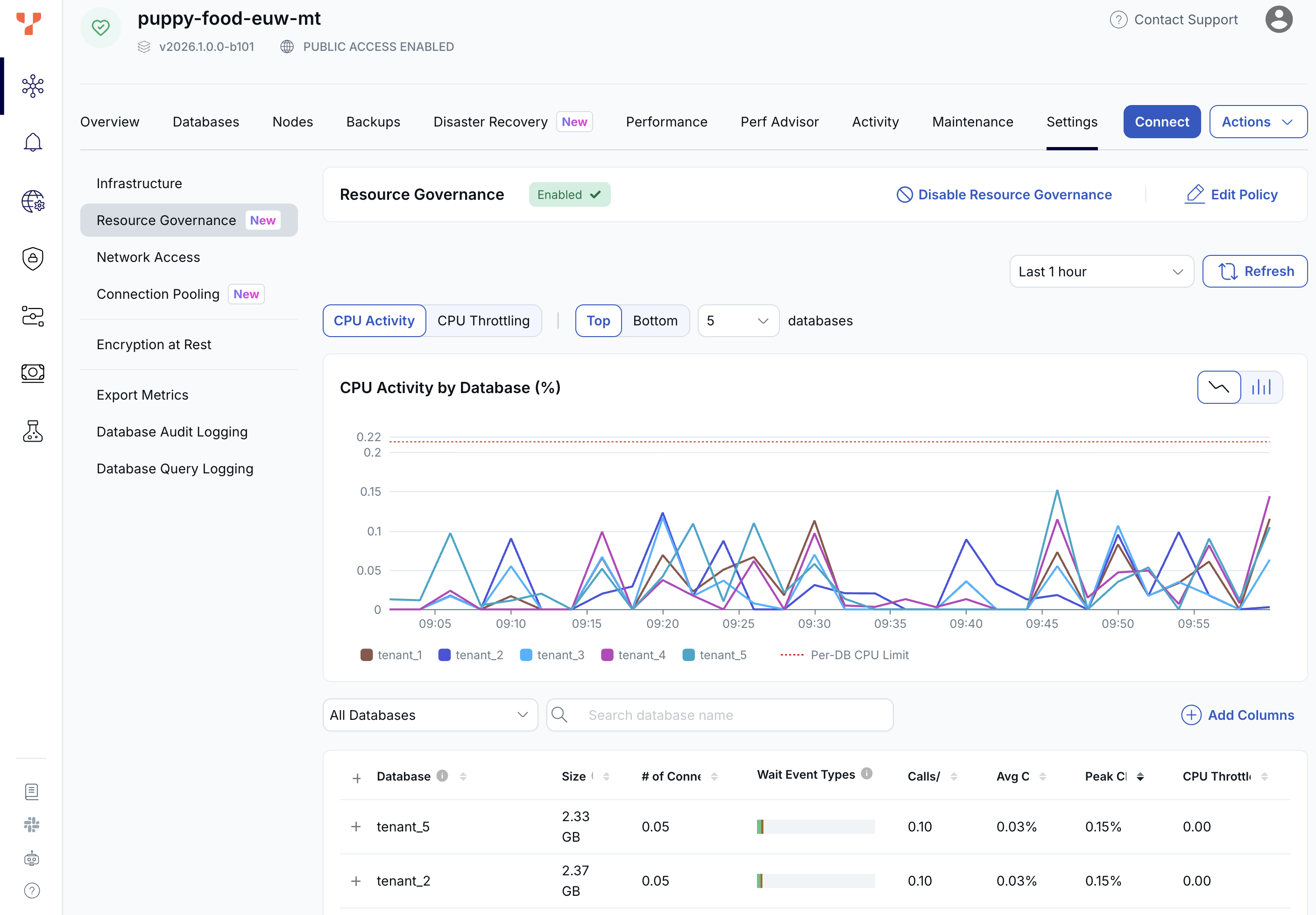
To enable Resource Governance, choose Enable Resource Governance. To disable it, click Disable Resource Governance.
Monitoring
The Resource Governance page lists all the YSQL databases in the cluster, along with the following metrics:
- CPU Activity by Database: shows CPU activity for all the databases in the cluster over time.
- CPU Throttling by Database: shows CPU throttling for all the databases in the cluster over time.
- Average CPU
- Peak CPU
To view a breakdown of the total load on a database, click the database in the list.
Resource governance policy
By default, each database can access up to 100% of available CPU when there is no contention, and this is suitable for most use cases.
To change the ceiling for all databases:
-
Click Edit Policy.
-
Enter the maximum.
Any single database cannot exceed this limit, regardless of how much spare CPU is available.
-
Click Configure.
Limitations
- The cluster must be running YugabyteDB v2026.1 or later.
- Resource Governance is only available for YSQL databases; YCQL keyspaces are not included.
- Currently, Resource Governance governs CPU resources only.