YugabyteDB Kubernetes Operator
The YugabyteDB Kubernetes Operator streamlines the deployment and management of YugabyteDB clusters in Kubernetes environments. You can use the Operator to automate provisioning, scaling, and handling lifecycle events of YugabyteDB clusters, and it provides additional capabilities not available via other automation methods (which rely on REST APIs, UIs, and Helm charts).
The Operator establishes ybuniverse as a Custom Resource Definition (CRD) in Kubernetes, enabling a declarative management of your YugabyteDB Anywhere (YBA) universe.
You can define and update these custom resources to manage your universe's configuration, including granular resource specifications (CPU and memory for Masters and TServers) and precise regional/zonal placement policies to ensure optimal performance and high availability. Custom resources support seamless upgrades with no downtime, as well as automated, transparent scaling, and cluster-balanced deployments.
EA
You can additionally convert Kubernetes universes that are managed via Helm charts to be managed by the YugabyteDB Kubernetes Operator, using the operator-import API. See Import universe.
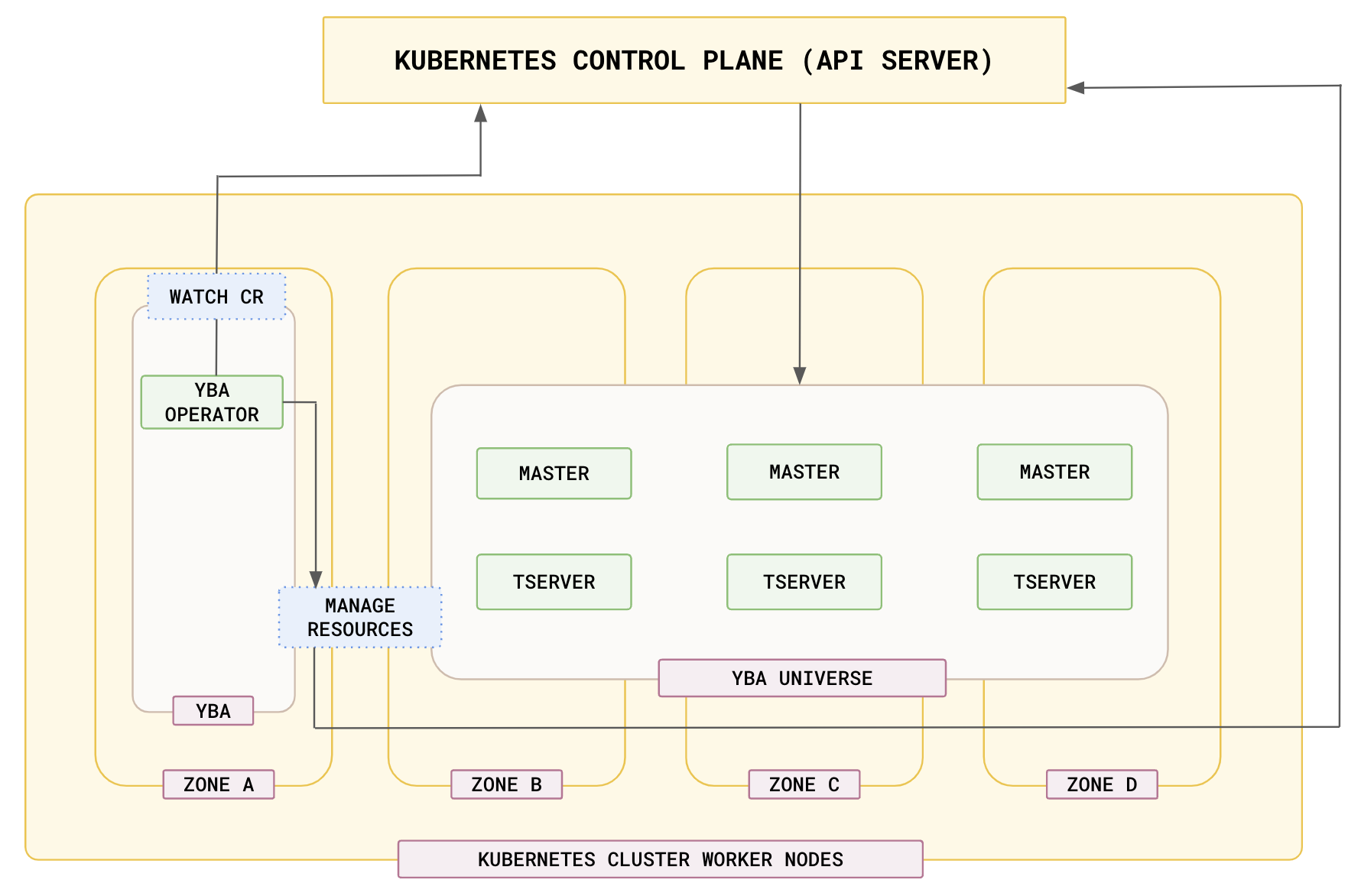
YugabyteDB Kubernetes Operator CRDs
The Operator is built around the YBUniverse CRD, which defines and manages a YugabyteDB universe.
The following additional CRDs support day 2 operations.
| CRD | Description |
|---|---|
| YBProvider | Define a Kubernetes provider for multi-cluster deployments and operator-managed universes (available in v2025.2.2 or later). |
| Release | Run multiple releases of YugabyteDB and upgrade the software in a YBA universe. |
| SupportBundle | Collect logs when a universe fails. |
| StorageConfig | Configure backup destinations. |
| Backup and RestoreJob | Take full backups of a universe and restore for data protection. |
| BackupSchedule | Schedule full and incremental backups of a universe. |
| PitrConfig | Configure point-in-time recovery (PITR) for a universe. |
| YBCertificate | Configure TLS certificates for encryption in transit (self-signed or cert-manager). |
For details of each CRD, run kubectl explain on the CR.
For example, to view all available configuration options for the YBUniverse custom resource, run the following command:
kubectl explain ybuniverse.spec
GROUP:   operator.yugabyte.io
KIND:    YBUniverse
VERSION:  v1alpha1

FIELD: spec <Object>

DESCRIPTION:
  Schema spec for a yugabytedb universe.

FIELDS:
 deviceInfo  <Object>
  Device information for the universe to refer to storage information for
  volume, storage classes etc.

 enableClientToNodeEncrypt   <boolean>
  Enable client to node encryption in the universe. Enable this to use tls
  enabled connnection between client and database.

 enableIPV6  <boolean>
  Enable IPV6 in the universe.

 enableLoadBalancer  <boolean>
  Enable LoadBalancer access to the universe. Creates a service with
  Type:LoadBalancer in the universe for tserver and masters.

 enableNodeToNodeEncrypt    <boolean>
  Enable node to node encryption in the universe. This encrypts the data in
  transit between nodes.

 enableYCQL  <boolean>
  Enable YCQL interface in the universe.

 enableYCQLAuth    <boolean>
  enableYCQLAuth enables authentication for YCQL inteface.

 enableYSQL  <boolean>
  Enable YSQL interface in the universe.

 enableYSQLAuth    <boolean>
  enableYSQLAuth enables authentication for YSQL inteface.

 gFlags    <Object>
  Configuration flags for the universe. These can be set on masters or
  tservers

 kubernetesOverrides  <Object>
  Kubernetes overrides for the universe. Please refer to yugabyteDB
  documentation for more details.
  https://docs.yugabyte.com/stable/yugabyte-platform/create-deployments/create-universe-multi-zone-kubernetes/#helm-overrides

 numNodes   <integer>
  Number of tservers in the universe to create.

 providerName <string>
  Preexisting Provider name to use in the universe.

 replicationFactor   <integer>
  Number of times to replicate data in a universe.

 universeName <string>
  Name of the universe object to create

 ybSoftwareVersion   <string>
  Version of DB software to use in the universe.

 ycqlPassword <Object>
  Used to refer to secrets if enableYCQLAuth is set.

 ysqlPassword <Object>
  Used to refer to secrets if enableYSQLAuth is set.

 zoneFilter  <[]string>
  Only deploy yugabytedb nodes in these zones mentioned in the list. Defaults
  to all zones if unspecified.
kubectl explain ybuniverse.spec.gFlags
GROUP:   operator.yugabyte.io
KIND:    YBUniverse
VERSION:  v1alpha1

FIELD: gFlags <Object>

DESCRIPTION:
  Configuration flags for the universe. These can be set on masters or
  tservers

FIELDS:
 masterGFlags <map[string]string>
  Configuration flags for the master process in the universe.

 perAZ <map[string]Object>
  Configuration flags per AZ per process in the universe.

 tserverGFlags <map[string]string>
  Configuration flags for the tserver process in the universe.
Prerequisites
Before installing the Kubernetes Operator, verify that the following components are installed and configured:
- Kubernetes cluster v1.27 or later.
- Helm v3.11 or later.
- Administrative access. Required for the Kubernetes cluster, including ability to create cluster roles, namespaces, and details on setting up necessary roles and permissions for the service account.
Service account
The YugabyteDB Kubernetes Operator requires a service account with sufficient permissions to manage resources in the Kubernetes cluster. When installing the operator, ensure that the service account has the necessary roles and cluster roles bound to it.
Cluster roles and namespace roles
ClusterRole: grants permissions at the cluster level, necessary for operations that span multiple namespaces, or have cluster-wide implications.Role: grants permissions in a specific namespace, and used for namespace-specific operations.
The yugaware chart, when installed with rbac.create=true, automatically creates appropriate ClusterRoles and Roles needed for the Kubernetes Operator.
Install Kubernetes Operator
To use the Kubernetes Operator with YugabyteDB Anywhere, you can either install YugabyteDB Anywhere using the operator, or upgrade an existing YugabyteDB installation.
To install YugabyteDB Anywhere using the YugabyteDB Kubernetes Operator, do the following:
-
Apply the following CRD:
kubectl apply -f https://raw.github.com/yugabyte/charts/2025.2.2/crds/concatenated_crd.yaml -
Run the following
helm installcommand to set the parameters from the preceding YAML file to install the YugabyteDB Anywhere (yugaware) Helm chart:# Modify the fields kubernetesOperatorNamespace and defaultUser username, email and password fields as required helm install yba yugabytedb/yugaware \ --version 2025.2.2 \ --namespace yb-platform \ --set yugaware.kubernetesOperatorEnabled=true \ --set yugaware.kubernetesOperatorNamespace='yb-platform-test' \ --set yugaware.defaultUser.enabled=true \ --set yugaware.defaultUser.username=yb_platform_user \ --set yugaware.defaultUser.email='yugabyte_k8s@yugabyte.com' \ --set yugaware.defaultUser.password='Password#Test123' -
Verify that YBA is up, and the Kubernetes Operator is installed successfully using the following commands:
kubectl get pods -n <yba_namespace>
To use the YugabyteDB Kubernetes Operator with an existing YugabyteDB Anywhere instance, perform an upgrade as follows:
-
Apply the following CRD:
kubectl apply -f https://raw.github.com/yugabyte/charts/2025.2.2/crds/concatenated_crd.yaml -
Get a list of Helm chart releases in namespace using the following command:
helm lsNAME NAMESPACE REVISION UPDATED STATUS CHART APP VERSION yba yb-platform-test 1 2024-05-08 16:42:47.480260572 +0000 UTC deployed yugaware-2.19.3 2.19.3.0-b140 -
Run the following
helm upgradecommand to enable the YBA upgrade:helm upgrade yba yugabytedb/yugaware --version 2025.2.2 \ --set yugaware.kubernetesOperatorEnabled=true,yugaware.kubernetesOperatorNamespace=yb-platform-test -
Verify that YBA is up, and the Kubernetes Operator is installed successfully using the following commands:
kubectl get pods -n <yba_namespace>kubectl get pods -n <operator_namespace>NAME READY STATUS RESTARTS AGE chart-1706728534-yugabyte-k8s-operator-0 3/3 Running 0 26hAdditionally, you should see no stack traces, but the following messages in the
KubernetesOperatorReconcilerlog:LOG.info("Finished running ybUniverseController");
Example workflows
Create a provider
Use the YBProvider CRD (available in v2025.2.2 or later) to define a Kubernetes provider that universes can reference via spec.providerName. The provider specifies cloud type, image registry, and per-region/per-zone settings such as storage class and namespace.
kubectl apply provider-demo.yaml -n yb-platform
# provider-demo.yaml
apiVersion: operator.yugabyte.io/v1alpha1
kind: YBProvider
metadata:
  name: test-provider
spec:
  cloudInfo:
    kubernetesProvider: gke
    kubernetesImageRegistry: quay.io/yugabyte/yugabyte
  regions:
    - code: us-west1
      zones:
        - code: us-west1-a
          cloudInfo:
            kubernetesStorageClass: yb-standard
            kubeNamespace: anabaria-devspace
        - code: us-west1-b
          cloudInfo:
            kubernetesStorageClass: yb-standard
            kubeNamespace: anabaria-devspace
        - code: us-west1-c
          cloudInfo:
            kubernetesStorageClass: yb-standard
            kubeNamespace: anabaria-devspace
You can then reference this provider in a Universe CR with placement information by setting spec.providerName to the provider's metadata.name (for example, test-provider).
Using a custom kubeconfig
To use a custom kubeconfig for the provider, specify it in either top-level spec.cloudInfo or in zone-level cloudInfo. The kubeconfig content must be stored in a Kubernetes secret with the key kubeconfig.
-
Create the secret:
kubectl create secret generic test-kubeconfig -n yb-operator --from-file=kubeconfig=/tmp/kubeconfig.conf -
Reference the secret in the YBProvider manifest via
kubeConfigSecret:apiVersion: operator.yugabyte.io/v1alpha1 kind: YBProvider metadata: name: test-provider spec: cloudInfo: kubernetesProvider: gke kubernetesImageRegistry: quay.io/yugabyte/yugabyte kubeConfigSecret: name: test-kubeconfig namespace: yb-operator regions: - code: us-west1 zones: - code: us-west1-a cloudInfo: kubernetesStorageClass: yb-standard kubeNamespace: anabaria-devspace - code: us-west1-b cloudInfo: kubernetesStorageClass: yb-standard kubeNamespace: anabaria-devspace - code: us-west1-c cloudInfo: kubernetesStorageClass: yb-standard kubeNamespace: anabaria-devspace
Create a universe
Use the YBUniverse CRD to create a universe using the kubectl apply command:
kubectl apply universedemo.yaml -n yb-platform
# universedemo.yaml
apiVersion: operator.yugabyte.io/v1alpha1
kind: YBUniverse
metadata:
  name: operator-universe-demo
spec:
  numNodes:    3
  replicationFactor:  1
  enableYSQL: true
  enableNodeToNodeEncrypt: true
  enableClientToNodeEncrypt: true
  enableLoadBalancer: false
  # Use your YBA version
  ybSoftwareVersion: "2.20.1.3-b3"
  enableYSQLAuth: false
  enableYCQL: true
  enableYCQLAuth: false
  gFlags:
    tserverGFlags: {}
    masterGFlags: {}
  deviceInfo:
    volumeSize: 400
    numVolumes: 1
    storageClass: "yb-standard"
  kubernetesOverrides:
    resource:
      master:
        requests:
          cpu: 2
          memory: 8Gi
        limits:
          cpu: 3
          memory: 8Gi
To check the status of the universe, do the following:
kubectl get ybuniverse -n yb-operator
NAME                     STATE   SOFTWARE VERSION
operator-universe-demo   Ready   2025.2.2.1-b1
To modify the universe, edit the CRD and use kubectl apply/edit operations.
Create a universe with placement information
Starting from YugabyteDB Anywhere v2025.2, you can specify placementInfo in the YBUniverse CRD to control regional and zonal placement of nodes. Use defaultRegion and regions with zone-level numNodes and optional preferred to define where nodes are placed. You need a Kubernetes provider (for example, one created via YBProvider) and set spec.providerName to its name.
kubectl apply universedemo-placement.yaml -n yb-platform
# universedemo-placement.yaml
apiVersion: operator.yugabyte.io/v1alpha1
kind: YBUniverse
metadata:
  name: operator-universe-demo
spec:
  placementInfo:
    defaultRegion: us-west1
    regions:
    - code: us-west1
      zones:
      - code: us-west1-a
        numNodes: 2
        preferred: true
      - code: us-west1-b
        numNodes: 1
        preferred: true
  providerName: test-provider
  numNodes: 3
  replicationFactor: 3
  enableYSQL: true
  enableNodeToNodeEncrypt: true
  enableClientToNodeEncrypt: true
  ybSoftwareVersion: 2025.2.0.0-b131
  enableYSQLAuth: false
  enableYCQL: true
  enableYCQLAuth: false
  enableIPV6: false
  deviceInfo:
    numVolumes: 1
    volumeSize: 800
  gFlags:
    masterGFlags: {}
    tserverGFlags: {}
  kubernetesOverrides:
    resource:
      master:
        requests:
          cpu: 2
          memory: 8Gi
        limits:
          cpu: 3
          memory: 8Gi
Add a different software release of YugabyteDB
Use the Release CRD to add a different software release of YugabyteDB:
kubectl apply updaterelease.yaml -n yb-platform
# updaterelease.yaml
apiVersion: operator.yugabyte.io/v1alpha1
kind: Release
metadata:
  name: "2.20.1.3-b3"
spec:
  config:
    version: "2.20.1.3-b3"
    downloadConfig:
      http:
        paths:
          helmChart: "https://charts.yugabyte.com/yugabyte-2.20.1.tgz"
          x86_64: "https://software.yugabyte.com/releases/2.20.1.3/yugabyte-2.20.1.3-b3-linux-x86_64.tar.gz"
Backup and restore
Specify a storage configuration CRD to configure backup storage, and perform backup and restore of your YBA universes as per the following example:
kubectl apply backuprestore.yaml -n yb-platform
# backuprestore.yaml
apiVersion: operator.yugabyte.io/v1alpha1
kind: StorageConfig
metadata:
  name: s3-config-operator
spec:
  config_type: STORAGE_S3
  data:
    AWS_ACCESS_KEY_ID: <ACCESS_KEY>
    AWS_SECRET_ACCESS_KEY: <SECRET>
    BACKUP_LOCATION: s3://backups.yugabyte.com/s3Backup

apiVersion: operator.yugabyte.io/v1alpha1
kind: Backup
metadata:
  name: operator-backup-1
spec:
  backupType: PGSQL_TABLE_TYPE
  storageConfig: s3-config-operator
  universe: <name-universe>
  timeBeforeDelete: 1234567890
  keyspace: postgres

apiVersion: operator.yugabyte.io/v1alpha1
kind: RestoreJob
metadata:
  name: operator-restore-1
spec:
  actionType: RESTORE
  universe:  <name of universe>
  backup: <name of backup to restore>
  keyspace: <keyspace overide>
Service account for backup
You can attach a service account to database pods to be used to access storage in S3 or GCS. The service account used for the database pods should have annotations for the IAM role. The service account to be used can be applied to the database pods as a Helm override with provider- or universe- level overrides.
The operator pod (with the YugabyteDB Anywhere instance) should have the IAM role for cloud storage access attached to its service account.
AWS
The IAM role used should be sufficient to access storage in S3.
To enable IAM roles to access storage in S3, set the Use S3 IAM roles attached to DB node for Backup/Restore Universe Configuration option (config key yb.backup.s3.use_db_nodes_iam_role_for_backup) to true. Refer to Manage runtime configuration settings.
The storage config CR should have IAM as the credential source.
apiVersion: operator.yugabyte.io/v1alpha1
kind: StorageConfig
metadata:
  name: s3-config-operator
spec:
  config_type: STORAGE_S3
  data:
    BACKUP_LOCATION: s3://backups.yugabyte.com/test
    USE_IAM: true //For IAM based access on GCP/S3
Provide the service account in the universe overrides section. The service account should have IAM roles configured for access to cloud storage.
apiVersion: operator.yugabyte.io/v1alpha1
kind: YBUniverse
metadata:
  name: operator-universe
spec:
  ...
  kubernetesOverrides:
    tserver:
      serviceAccount: <KSA_NAME>
For more information, refer to Enable IAM roles for service accounts in the AWS documentation.
GKE
The IAM role used should be sufficient to access storage in GCS.
The storage config CR should have IAM as the credential source.
apiVersion: operator.yugabyte.io/v1alpha1
kind: StorageConfig
metadata:
  name: gcs-config-operator
spec:
  config_type: STORAGE_GCS
  data:
    BACKUP_LOCATION: gs://gcp-bucket/test_backups
    USE_IAM: true //For IAM based access on GCP/S3
Provide the service account in the universe overrides section. The service account should have IAM roles configured for access to cloud storage.
apiVersion: operator.yugabyte.io/v1alpha1
kind: YBUniverse
metadata:
  name: operator-universe
spec:
  ...
  kubernetesOverrides:
    tserver:
      serviceAccount: <KSA_NAME>
For more information, refer to Authenticate to Google Cloud APIs from GKE workloads in the Google Cloud documentation.
Scheduled backups
This feature is EA . Backup schedules support taking full backups based on cron expressions or specified frequencies. They also allow you to configure incremental backups to run in between these full backups, providing finer-grained recovery points.
When an operator schedule triggers a backup, a corresponding CR is automatically created for that specific backup. The operator names this CR appropriately, and marks it with "ignore-reconciler-add".
Operator schedules maintain owner references to their respective YugabyteDB Anywhere universes. This ensures that when you delete a source universe, its associated schedule is also deleted.
The operator's backup schedule also supports Point-In-Time Recovery (PITR) from a backup. See Create a scheduled backup policy with PITR for more details.
Setup
Set up scheduled backups as follows:
-
Apply latest CRDs with new scheduled backups CRD on the Kubernetes cluster.
kubectl apply -f https://raw.github.com/yugabyte/charts/2025.2.2/crds/concatenated_crd.yaml -
Verify scheduled backup fields in the BackupSchedule CRD specification using
kubectl explainto understand the available configuration options.$ kubectl explain backupschedules.operator.yugabyte.io.specGROUP:operator.yugabyte.io KIND:BackupSchedule VERSION:v1alpha1 FIELDS: backupType<string>-required- Type of backup to be taken. Allowed values are - YQL_TABLE_TYPE PGSQL_TABLE_TYPE cronExpression<string> Frequency of full backups in cron expression. enablePointInTimeRestore<boolean> Enable Point in time restore for backups created with the schedule incrementalBackupFrequency<integer> Frequency of incremental backups in milliseconds keyspace<string>-required- Name of keyspace to be backed up. schedulingFrequency<integer> Frequency of full backups in milliseconds. storageConfig<string>-required- Storage configuration for the backup, refers to a storageconfig CR name. Should be in the same namespace as the backupschedule. tableByTableBackup<boolean> Boolean indicating if backup is to be taken table by table. timeBeforeDelete<integer> Time before backup is deleted from storage in milliseconds. universe<string>-required- Name of the universe for which backup is to be taken, refers to a ybuniverse CR name. Should be in the same namespace as the backupschedule.
Example
This example describes how to create and delete scheduled backups, and assumes you have the following:
- An existing YugabyteDB Anywhere universe deployed using the YugabyteDB Kubernetes Operator.
- A configured storage location for your backups.
Use the following CRD to create a scheduled backup:
kubectl apply scheduled-backup-demo.yaml -n schedule-cr
apiVersion:operator.yugabyte.io/v1alpha1
kind:BackupSchedule
metadata:
  name:operator-scheduled-backup-1
spec:
  backupType:PGSQL_TABLE_TYPE
  storageConfig:s3-config-operator
  universe:operator-universe-test-2
  timeBeforeDelete:1234567890
  keyspace:test
  schedulingFrequency:3600000
  incrementalBackupFrequency:900000
Backups are created from the schedules (using their auto-created CRs). You can verify them using the kubectl get backups as follows:
kubectl get backups -n schedule-cr
NAME                                                          AGE
operator-scheduled-backup-1-1069296176-full--06-43-25         32m
operator-scheduled-backup-1-1069296176-incremental--06-59-26  16m
operator-scheduled-backup-1-1069296176-incremental--07-13-26  2m55s
Backup schedules get automatically deleted when you delete the YBA universe that owns it as per the following:
$kubectl get backups -n schedule-cr
NAME                           AGE
operator-scheduled-backup-1   101m
$ kubectl get ybuniverse -n schedule-cr
NAME                       STATE   SOFTWARE VERSION
operator-universe-test-2   Ready   2.25.2.0-b40
# Delete YBA universe
$ kubectl delete ybuniverse operator-universe-test-2 -n schedule-cr
ybuniverse.operator.yugabyte.io "operator-universe-test-2" deleted
$ kubectl get backupschedule -n schedule-cr
No resources found in schedule-cr namespace.
Incremental backups
EA Use backup schedules to schedule full backups at specific intervals or using a cron expression. You can also configure incremental backups to run in between these full backups, providing finer-grained recovery points.
This functionality creates a chain of references for your backups. Each incremental backup CR references its preceding backup in the chain, whether a full or another incremental backup. This chain always leads back to the initial full backup.
When you initiate an incremental backup, it is appended to the last successful backup (either full or incremental) within that existing chain. This ensures a consistent and complete backup history.
To delete the backups, you delete the first full backup, and this action triggers a chain of deletes. You cannot delete individual incremental backups, as doing so can break the backup chain.
Setup
Set up incremental backups as follows:
-
Apply the latest CRD for backup:
kubectl apply -f https://raw.github.com/yugabyte/charts/2025.2.2/crds/concatenated_crd.yaml -
Verify incremental backup fields in the backup CRD specification using
kubectl explainto understand the available configuration options.$ kubectl explain backups.operator.yugabyte.io.specGROUP: operator.yugabyte.io KIND: Backup VERSION: v1alpha1 FIELDS: ... incrementalBackupBase <string> Base backup Custom Resource name. Operator will add an incremental backup to the existing chain of backups at the last.
Example
This example describes how to create and delete incremental backups, and assumes you have the following:
- An existing YugabyteDB Anywhere universe deployed using the YugabyteDB Kubernetes Operator.
- A configured storage location for your backups. You must have an existing base backup (either a full backup or a previous incremental backup) to create the new incremental backup.
Use the following CRD to create an incremental backup:
kubectl apply operator-backup-demo.yaml -n schedule-cr
#operator-backup-demo.yaml
apiVersion: operator.yugabyte.io/v1alpha1
kind: Backup
metadata:
  name: operator-backup-1
spec:
  backupType: PGSQL_TABLE_TYPE
  storageConfig: az-config-operator-1
  universe: operator-universe-test-1
  timeBeforeDelete: 1234567890
  keyspace: test
  incrementalBackupBase: <base full backup cr name>
Deleting full backup deletes all incremental backups associated with it as follows:
# Get all backups in the 'schedule-cr' namespace.
$ kubectl get backups -n schedule-cr
NAME                                                                     AGE
operator-scheduled-backup-1-1069296176-full-2025-02-27-06-43-25          32m
operator-scheduled-backup-1-1069296176-incremental-2025-02-27-06-59-26   16m
operator-scheduled-backup-1-1069296176-incremental-2025-02-27-07-13-26   2m55s
$ kubectl delete backup operator-scheduled-backup-1-1069296176-full-2025-02-27-06-43-25 -n schedule-cr
$ kubectl get backups -n schedule-cr
No resources found in schedule-cr namespace.
Configure PITR
Use the PitrConfig CRD to configure point-in-time recovery (PITR) for a universe.
Currently, only declarative operations are supported, including creating a PITR configuration, updating the list of databases, and deleting the configuration. Imperative operations such as restore from a PITR configuration will be supported in a future release.
kubectl apply pitr-config.yaml -n test-pitr
# pitr-config.yaml
apiVersion: operator.yugabyte.io/v1alpha1
kind: PitrConfig
metadata:
  name: pitr-config
  namespace: test-pitr
spec:
  name: pitr-config
  universe: test-universe
  database: 'yugabyte'
  tableType: 'YSQL'
Configure TLS certificates
Use the YBCertificate CRD to configure TLS certificates for encryption in transit:
kubectl apply yb-certificate.yaml -n yb-operator
# yb-certificate.yaml
apiVersion: ybcertificates.operator.yugabyte.io/v1alpha1
kind: YBCertificate
metadata:
  name: yb-certificate
spec:
  certType: SELF_SIGNED   # SELF_SIGNED | K8S_CERT_MANAGER
  certificateSecretRef:
    name: cert_secret      # Name of the secret
    namespace: yb-operator # Optional: defaults to operator namespace
Support bundle
Use the SupportBundle CRD to create a support bundle:
kubectl apply supportbundle.yaml -n yb-platform
# supportbundle.yaml
apiVersion: operator.yugabyte.io/v1alpha1
kind: SupportBundle
metadata:
  name: bundle1
  namespace: user-test
spec:
  universeName: test-1
  collectionTimerange:
    startDate: 2023-08-07T11:55:00Z
  components:
  - UniverseLogs
  - ApplicationLogs
  - OutputFiles
  - ErrorFiles
  - CoreFiles
  - Instance
  - ConsensusMeta
  - TabletMeta
  - YbcLogs
  - K8sInfo
  - GFlags
Import universe
EA Available in YugabyteDB Anywhere v2025.2.2 and later.
Use the operator import universe feature to import existing YugabyteDB Anywhere Kubernetes universes that are managed via Helm charts to be managed by the Kubernetes Operator.
Currently, universes with any of the following configurations are not supported for import:
- Universes configured in an xCluster setup.
- Universes with a Read Replica cluster.
- Universes configured with availability zone (AZ) level overrides.
Before you begin
- Install the operator. The operator must be enabled on your instance. See Installing Kubernetes Operator.
- Verify namespace configuration.
- If the operator is configured to watch a single, specific namespace, the namespace provided in the import payload must match that runtime configuration (for example,
yb.kubernetes.operator.namespace). - If the operator is not watching a specific namespace, the payload should be the namespace you want the resources to be created in.
- If the operator is configured to watch a single, specific namespace, the namespace provided in the import payload must match that runtime configuration (for example,
- Update universe CRDs. You must update the CRDs for your Kubernetes universe to the latest for the version of YugabyteDB Anywhere you have installed. Failure to do so may result in scaling down of pod resources during future edit operations.
Import cannot be reversed
After a universe and its related resources are imported to be managed by the operator most edit operations are allowed only via the operator. The API and UI block edit actions on the imported resource. This operation cannot be reversed.Import
To perform an operator import, you use the YugabyteDB Anywhere API.
You need an API token to authenticate when calling the endpoints, and account details.
In the following commands, replace the following values:
Replace |
With |
|---|---|
<platform-url> |
The URL of your YugabyteDB Anywhere instance. |
<customer-uuid> |
Your customer UUID. |
<universe-uuid> |
The UUID of the universe to import. |
<api-token> |
Your API token. |
<namespace> |
The Kubernetes namespace where the custom resources will be created. This must be a namespace the operator is watching; when set, this corresponds to the runtime configuration yb.kubernetes.operator.namespace. |
Precheck
Run the precheck to ensure the universe is eligible for import. Returns HTTP 200 on success.
An example API request is as follows:
curl --request POST \
  --url https://<platform-url>/api/v2/customers/<customer-uuid>/universes/<universe-uuid>/operator-import/precheck \
  --header 'Accept: application/json' \
  --header 'Content-Type: application/json' \
  --header 'X-AUTH-YW-API-TOKEN: <api-token>' \
  -d '{"namespace": "<namespace>"}'
Import
Creates operator resources for the universe in the given namespace. Returns a task UUID and resource UUID.
An example API request is as follows:
curl --request POST \
  --url https://<platform-url>/api/v2/customers/<customer-uuid>/universes/<universe-uuid>/operator-import \
  --header 'Accept: application/json' \
  --header 'Content-Type: application/json' \
  --header 'X-AUTH-YW-API-TOKEN: <api-token>' \
  -d '{"namespace": "<namespace>"}'
Resources imported
Importing a universe to the operator creates or adopts the following in the target namespace:
- Universe.
- Provider, if all universes managed by that provider are being brought under operator control.
- Backups.
- Backup schedules.
- Storage configurations related to the backups or backup schedules, including secrets to access the storage configuration.
- Release, including secrets to access the release.
Limitations
- YugabyteDB Kubernetes Operator can only deploy universes on the same Kubernetes cluster it is deployed on.
- YugabyteDB Kubernetes Operator is single cluster only, and does not support multi-cluster universes.
- Currently, YugabyteDB Kubernetes Operator does not support the following features:
- Software upgrade rollback
- xCluster
- Read Replica
- Encryption-At-Rest
- Only self-signed encryption in transit is supported. Editing this later is not supported.