Follower reads
YugabyteDB requires reading from the leader to read the latest data. However, for applications that do not require the latest data or are working with unchanging data, the cost of contacting a potentially remote leader to fetch the data may be wasteful. Your application may benefit from better latency by reading from a replica that is closer to the client. The same applies to a read replica: an asynchronous copy of the data placed near the client in another region that can serve reads when follower reads are on.
Follower reads are applicable for applications that can tolerate staleness. Replicas may not be completely up-to-date with all updates, so this design may respond with stale data. Consider the following use cases:
-
Rarely changing data. Suppose a storefront in one region serves a product catalog whose leader is in another. Descriptions and prices change occasionally, and a page a few seconds behind is fine for the shopper. The closest replica can serve those reads, so each page view avoids a round trip to the remote leader.
-
Latency-tolerant (staleness). Suppose a social media post gets a million likes and more continuously. For a post with massive likes, slightly stale reads are acceptable, and immediate updates are not necessary because the absolute number may not really matter to someone reading the post. Such applications don't need to always make requests directly to the leader. Instead, a slightly older value from the closest replica can achieve improved performance with lower latency.
You can specify how much staleness the application can tolerate. When enabled, read-only operations may be handled by the closest replica, instead of having to go to the leader.
For information on how a read chooses a replica, how stale the result is, and how to turn follower reads on, see Follower reads.
Leaders and leader leases
In a distributed environment, when one node in a cluster is elected as the leader holding the latest data, another node may assume that it is the leader, and that it holds the latest data. This could result in serving stale reads to a client. To avoid this confusion, YugabyteDB provides a leader lease mechanism where an elected node member is guaranteed to be the leader until its lease expires.
The leader lease mechanism guarantees to serve strongly consistent reads where a client can fetch reads directly from the leader, because the leader under lease will have the latest data.
For an illustration of the performance improvements using leader leases, see Low Latency Reads in Geo-Distributed SQL with Raft Leader Leases.
Example
This example uses follower reads because the transaction is marked read-only:
SET yb_read_from_followers = true;
START TRANSACTION READ ONLY;
SELECT * FROM t WHERE k='k1';
COMMIT;
SET yb_read_from_followers = false;
 k  | v
----+----
 k1 | v1
Use SET LOCAL inside a transaction to have follower reads turned on only for the transaction. Set yb_read_from_followers before any statement is executed in the block:
START TRANSACTION READ ONLY;
SET LOCAL yb_read_from_followers = true;
SELECT * FROM t WHERE k='k1';
COMMIT;
 k  | v
----+----
 k1 | v1
This example uses follower reads because the session is marked read only:
SET SESSION CHARACTERISTICS AS TRANSACTION READ ONLY;
SET yb_read_from_followers = true;
SELECT * FROM t WHERE k='k1';
 k  | v
----+----
 k1 | v1
(1 row)
The following is a JOIN example that uses follower reads:
CREATE TABLE table1(k int primary key, v int);
CREATE TABLE table2(k int primary key, v int);
INSERT INTO table1 VALUES (1, 2), (2, 4), (3, 6), (4,8);
INSERT INTO table2 VALUES (1, 3), (2, 6), (3, 9), (4,12);
SET yb_read_from_followers = true;
SET SESSION CHARACTERISTICS AS TRANSACTION READ ONLY;
SELECT * FROM table1, table2 WHERE table1.k = 3 AND table2.v = table3.v;
 k | v | k | v
---+---+---+---
 3 | 6 | 2 | 6
(1 row)
Follower read staleness
The following examples demonstrate staleness in a single session after enabling the yb_follower_read_staleness_ms property.
First, set the session characteristics; the READ WRITE setting is the default, and shown here for clarity only.
SET SESSION CHARACTERISTICS AS TRANSACTION READ WRITE;
INSERT INTO t VALUES ('k1', 'v1')
/* sleep 10s */
SELECT * FROM t WHERE k = 'k1';
 k  | v
----+----
 k1 | v1
(1 row)
Next run some updates separated by sleep statements of 10 seconds each.
UPDATE t SET  v = 'v1+1' WHERE k = 'k1';
/* sleep 10s */
UPDATE t SET  v = 'v1+2' WHERE k = 'k1';
/* sleep 10s */
This query displays the latest version of the row because the transaction setting for the session is still READ WRITE.
SELECT * FROM t WHERE k = 'k1';
 k  |  v
----+------
 k1 | v1+2
(1 row)
Next, set the transaction to READ ONLY and enable follower reads. The default value for yb_follower_read_staleness_ms is 30000 (30 seconds), so this query will display the version of the row from 30 seconds ago.
SET SESSION CHARACTERISTICS AS TRANSACTION READ ONLY;
SET yb_read_from_followers = true;
SELECT * FROM t WHERE k = 'k1';
 k  |  v
----+------
 k1 | v1
(1 row)
Set the yb_follower_read_staleness_ms property to 5000 (5 seconds) and run the query again. The query will display the version of the row from 5 seconds ago.
SET yb_follower_read_staleness_ms = 5000;
SELECT * FROM t WHERE k = 'k1';
 k  |  v
----+------
 k1 | v1+2
(1 row)
Next, set yb_follower_read_staleness_ms to 15000 (15 seconds) and run the query again. This query will display the version of the row from 15 seconds ago.
SET yb_follower_read_staleness_ms = 15000;
SELECT * FROM t WHERE k = 'k1';
 k  |  v
----+------
 k1 | v1+1
(1 row)
Finally, set yb_follower_read_staleness_ms to 25000 (25 seconds) and run the query again. This query will display the version of the row from 25 seconds ago.
SET yb_follower_read_staleness_ms = 25000;
SELECT * FROM t WHERE k = 'k1';
 k  |  v
----+------
 k1 | v1
(1 row)
Note that your results may differ slightly depending on how quickly you run the queries.
You configure follower reads by setting the consistency level to ONE, and how stale a follower read may be using --max_stale_read_bound_time_ms.
In this tutorial, you update a single key-value over and over and read it from the tablet leader. You then stop that workload and run it again so the reads come from a follower.
Create a cluster
If a local universe is currently running, first destroy it.
Start a local four-node universe with an RF of 3 by first creating a single node, as follows:
./bin/yugabyted start \
                --advertise_address=127.0.0.1 \
                --base_dir=${HOME}/var/node1 \
                --cloud_location=aws.us-east-2.us-east-2a
On macOS, the additional nodes need loopback addresses configured, as follows:
sudo ifconfig lo0 alias 127.0.0.2
sudo ifconfig lo0 alias 127.0.0.3
sudo ifconfig lo0 alias 127.0.0.4
Next, join more nodes with the previous node as needed. yugabyted automatically applies a replication factor of 3 when a third node is added.
Start the second node as follows:
./bin/yugabyted start \
                --advertise_address=127.0.0.2 \
                --base_dir=${HOME}/var/node2 \
                --cloud_location=aws.us-east-2.us-east-2b \
                --join=127.0.0.1
Start the third node as follows:
./bin/yugabyted start \
                --advertise_address=127.0.0.3 \
                --base_dir=${HOME}/var/node3 \
                --cloud_location=aws.us-east-2.us-east-2c \
                --join=127.0.0.1
Start the fourth node as follows:
./bin/yugabyted start \
                --advertise_address=127.0.0.4 \
                --base_dir=${HOME}/var/node4 \
                --cloud_location=aws.us-east-2.us-east-2d \
                --join=127.0.0.1
After starting the yugabyted processes on all the nodes, configure the data placement constraint of the universe, as follows:
./bin/yugabyted configure data_placement --base_dir=${HOME}/var/node1 --fault_tolerance=zone
This command can be executed on any node where you already started YugabyteDB.
To check the status of a running multi-node universe, run the following command:
./bin/yugabyted status --base_dir=${HOME}/var/node1
Write some data
Download the YugabyteDB workload generator JAR file (yb-sample-apps.jar) by running the following command:
wget https://github.com/yugabyte/yb-sample-apps/releases/download/v1.4.1/yb-sample-apps.jar -O yb-sample-apps.jar
By default, the YugabyteDB workload generator runs with strong read consistency, where all data is read from the tablet leader. You populate exactly one key with a 10KB value. Because the replication factor is 3, this key is replicated to only three of the four nodes in the cluster.
Run the CassandraKeyValue workload application to constantly update this key-value, as well as perform reads with strong consistency against the local cluster, as follows:
$ java -jar ./yb-sample-apps.jar --workload CassandraKeyValue \
                                    --nodes 127.0.0.1:9042 \
                                    --nouuid \
                                    --num_unique_keys 1 \
                                    --num_threads_write 1 \
                                    --num_threads_read 1 \
                                    --value_size 10240
In the preceding command, the value of num_unique_keys is set to 1, which means a single key key:0 was overwritten. You can verify this using ycqlsh as follows:
$ ./bin/ycqlsh 127.0.0.1
Connected to local cluster at 127.0.0.1:9042.
[ycqlsh 5.0.1 | Cassandra 3.9-SNAPSHOT | CQL spec 3.4.2 | Native protocol v4]
Use HELP for help.
Run a query as follows:
ycqlsh> SELECT k FROM ybdemo_keyspace.cassandrakeyvalue;
 k
-------
 key:0

(1 rows)
When performing strongly consistent reads, all reads are served by the tablet leader of the tablet that contains the key key:0. Browse to the tablet-servers page, where you can see that all the requests are indeed being served by one YB-TServer, as shown in the following illustration:
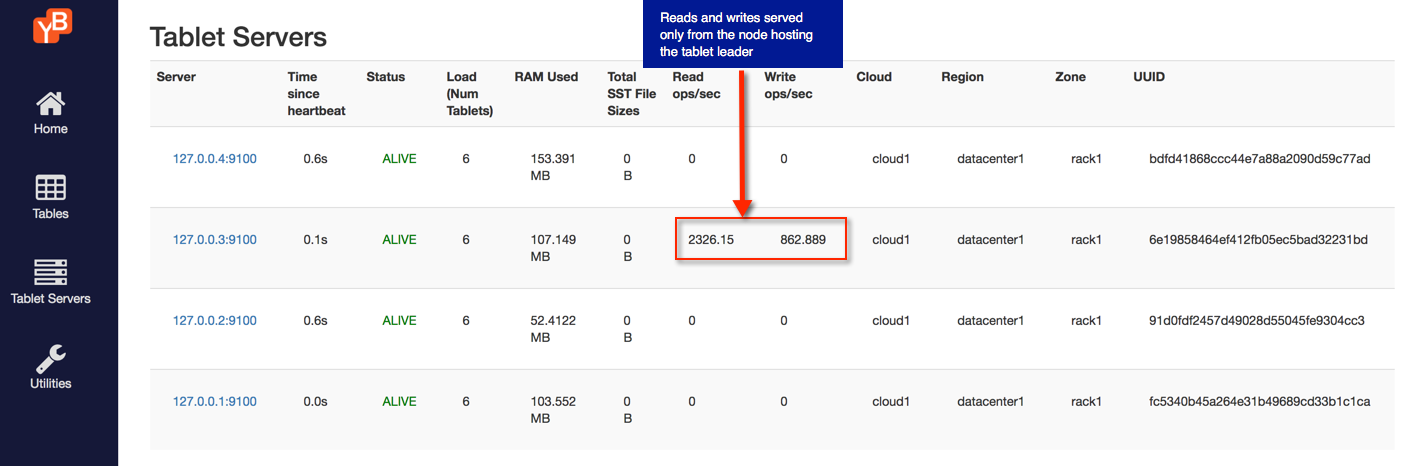
Follower reads from tablet replicas
Stop the workload application, and then run it as follows:
$ java -jar ./yb-sample-apps.jar --workload CassandraKeyValue \
                                    --nodes 127.0.0.1:9042 \
                                    --nouuid \
                                    --num_unique_keys 1 \
                                    --num_threads_write 1 \
                                    --num_threads_read 1 \
                                    --value_size 10240 \
                                    --local_reads
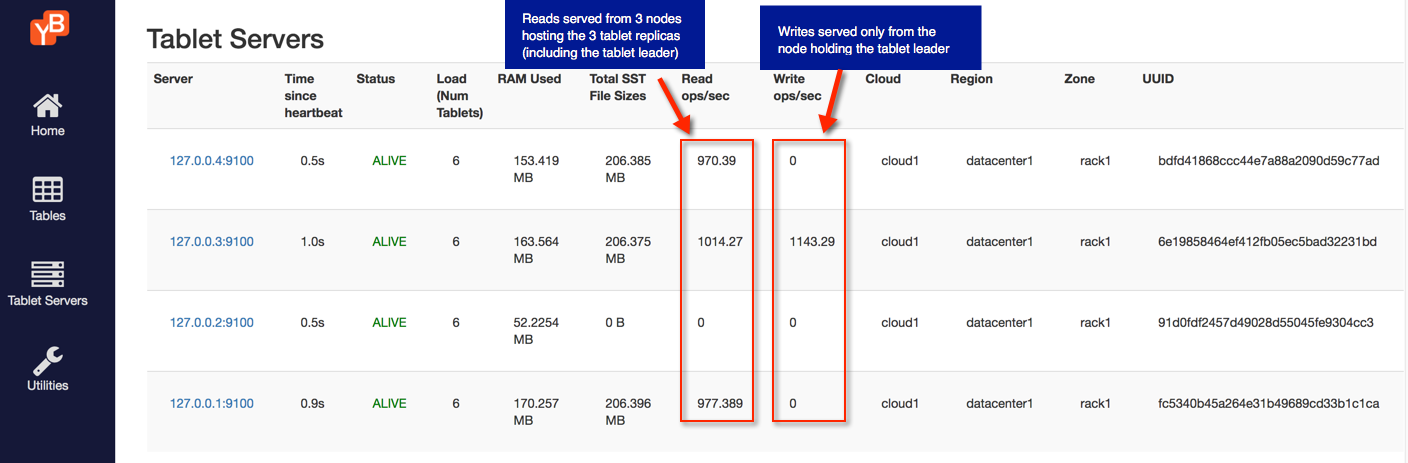
Adding --local_reads sets the consistency level to ONE for reads, so a follower can serve them. Updates to the same key key:0 still go through the tablet leader.
You can see this by refreshing the tablet-servers page. The writes are served by a single YB-TServer that is the leader of the tablet for the key key:0, while multiple YB-TServer replicas serve the reads.
Clean up
You can shut down the local cluster by following the instructions provided in Destroy a local universe.