CDC using Apache Flink CDC TECH PREVIEW
Flink CDC is a data integration framework that combines Apache Flink stream processing with Debezium change capture to read row-level changes from operational databases and continuously apply them to downstream systems. Using Flink CDC with YugabyteDB as a source database enables you to stream change events for the following use cases:
- Real-time data propagation: Stream YugabyteDB changes to Kafka, Elasticsearch, Iceberg, or data lakes.
- Operational analytics: Feed a warehouse or lakehouse continuously.
- Event-driven architectures: Turn row-level changes into Flink streams.
- Near-zero downtime migrations: Combine snapshot and change capture to migrate away from YugabyteDB with minimal disruption.
Flink CDC uses the Debezium PostgreSQL connector internally to capture row-level changes from YugabyteDB's logical replication stream. The key difference from a standalone Debezium connector is that Flink CDC converts change records into a continuous Flink stream, allowing you to process data using the Flink Table API or Flink SQL before routing it to any downstream Flink integration (for example, Kafka, Iceberg, or a JDBC sink).
Yugabyte maintains a Flink CDC build for YugabyteDB as a GitHub repository with pre-built connector JARs published on the Releases page.
Architecture
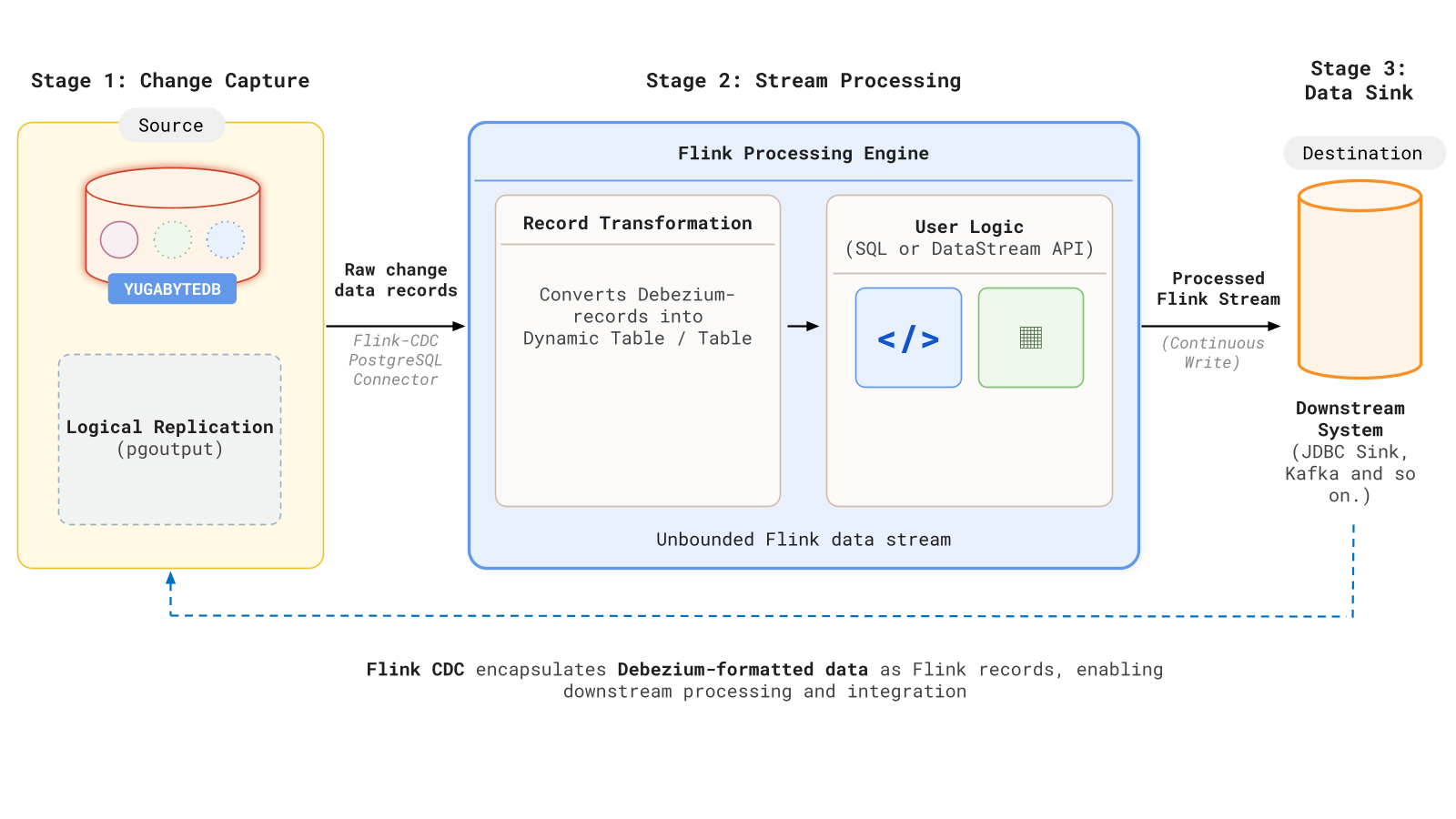
The Flink CDC integration involves a three-stage streaming pipeline:
- Change capture (source): The Flink
postgres-cdcconnector reads raw change records from YugabyteDB via a logical replication slot using thepgoutputdecoding plugin. - Stream processing (Flink): The connector converts the incoming change records (Debezium format internally) into an unbounded Flink dynamic table. This stream can be processed, filtered, or transformed using Flink SQL or the DataStream API.
- Data sink (destination): The processed Flink stream is written continuously to a downstream system using a Flink sink connector (for example, a JDBC sink, Kafka topic, or Iceberg table).
Use Flink CDC
Flink CDC with YugabyteDB is TP . At a high level, a YugabyteDB-to-downstream Flink CDC pipeline looks like this:
-
Start a YugabyteDB cluster and note the IP address of a YB-TServer node that Flink can reach.
-
Create source tables in YugabyteDB, and run the following in
ysqlshto create the publication and logical replication slot used by the Flinkpostgres-cdcconnector:CREATE PUBLICATION dbz_publication FOR ALL TABLES; SELECT * FROM pg_create_logical_replication_slot('flink', 'pgoutput');Use a unique slot name for each Flink pipeline, and tune CDC WAL retention so the slot can survive expected consumer downtime (see Best practices).
-
Deploy a Flink cluster with the
postgres-cdcand JDBC connector JARs (see Get started). -
Open the Flink SQL Client and define a
postgres-cdcsource table and a sink table. -
Submit the Flink job: Define source and sink tables in the Flink SQL Client and run a streaming
INSERT INTO … SELECT …job (see Initiate the streaming job). -
Validate that INSERT, UPDATE, and DELETE operations propagate end-to-end, and monitor the job at the Flink Web UI (for example,
http://localhost:8081).
To disable the feature, you have to cancel the Flink job. Optionally, drop the publication and replication slot when you no longer need change capture on the database. See Disable the pipeline.
Get started
Deploy a YugabyteDB-to-PostgreSQL pipeline using Docker Compose and the Flink SQL Client.
Best practices
- Always define primary keys on source tables; choose distributed keys to avoid write hotspots.
- Use a unique
slot.namevalue for every pipeline to prevent conflicts on active replication slots. - Set
decoding.plugin.nametopgoutput. YugabyteDB does not support the defaultdecoderbufsplugin. - Do not enable
scan.incremental.snapshot.enabled. YugabyteDB does not support Incremental snapshots. - Tune YugabyteDB CDC WAL retention flags (
cdc_wal_retention_time_secs,cdc_intent_retention_ms) to exceed the maximum expected consumer downtime. - Configure checkpointing together with a forgiving
fixed-delayrestart strategy (see Unsupported scenarios). - Monitor CDC lag, retention headroom, and checkpoint health as SLO signals.
Unsupported scenarios
- Incremental snapshots. YugabyteDB does not currently support incremental snapshots. Keep
scan.incremental.snapshot.enabledat its defaultfalsesetting. Because checkpointing is unavailable during initial snapshots, long-running snapshot processes may encounter timeouts. Recommended mitigation parameters include:- Set
execution.checkpointing.intervalto10min - Set
execution.checkpointing.tolerable-failed-checkpointsto100 - Use
restart-strategy: fixed-delaywithrestart-strategy.fixed-delay.attempts: 2147483647.
- Set
- Transactional atomicity. Default configurations do not guarantee cross-table consistency during end-to-end propagation.
- Schema evolution. DDL changes are not mirrored automatically and must be managed through manual intervention.
- Exactly-once processing. The
postgres-cdcsource supports exactly-once, but end-to-end delivery depends on a transactional sink. Standard JDBC sinks provide at-least-once delivery. - Primary key requirement. Tables without primary keys are not recommended. The common workaround using
scan.incremental.snapshot.chunk.key-columnrelies on unsupported incremental snapshotting. - Slot name conflicts. Assign a unique
slot.nameto every pipeline to prevent errors regarding active PIDs on the same slot.