Point-in-time recovery
Point-in-time recovery → across different products


Point-in-time (PIT) recovery in YugabyteDB is a set of capabilities for recovering from human or logical errors at the SQL or CQL level. For example, a mistyped UPDATE, an accidental DROP TABLE, or a bad application write.
These scenarios are different from hardware failure or disk corruption. Failed or corrupted disks typically require a full backup and restore, which moves large amounts of data and can involve significant downtime. PIT recovery instead aims to get you back to a known-good state quickly, often with little or no data movement and without taking the cluster offline for a bulk restore.
You recover to a user-specified moment (up to microsecond precision) inside a configured retention window. To use most of these capabilities, you first enable PITR by creating a snapshot schedule for the database or keyspace.
The PIT recovery family
YugabyteDB provides four complementary ways to work with a point in time:
| Capability | What it does | Best when |
|---|---|---|
| Inspect at PIT | Query the database as it existed at an earlier time (read-only). Also referred to as time travel queries. | You need to find when or what went wrong, or recover a small amount of data surgically on the production database. |
| Clone to PIT | Create a fast, lightweight, writable copy (or branch) of the database as of a point in time on the same cluster. Also referred to as database branching. | Recent writes must be preserved; you can perform forensic search and extract/merge on the original cluster. |
| Rewind to PIT | Rewind the original database to an earlier point in time. Intervening writes are discarded. | There were no important writes after the error, or those writes can be discarded or replayed from an external log. |
| Restore to PIT | Restore from a snapshot or backup to a chosen point in time, on the original or an alternate cluster. | Policy requires recovery off the production cluster, or you need a longer retention window on cheaper backup storage. |
Choosing an approach
- Start with Inspect at PIT when you need to determine when the error occurred or what data changed.
- Use Rewind to PIT when intervening writes can be discarded (or replayed from an external application log).
- Use Clone to PIT when intervening writes must be preserved and forensic recovery is allowed on the production cluster.
- Use Restore to PIT when recovery must happen on an alternate cluster, or you need a longer retention window from backup storage. On a manually managed cluster this is an advanced workflow; YugabyteDB Anywhere is the recommended path.
Use the following comparison when deciding:
| Inspect at PIT | Clone to PIT | Rewind to PIT | Restore to PIT | |
|---|---|---|---|---|
| Target cluster | Original | Original | Original | Original or alternate |
| Database affected | Original (read-only view) | New cloned database | Original database | Restored database |
| Crosses DDL boundaries | No | Yes | Yes | No |
| Newest recoverable time | Seconds ago | Seconds ago | Seconds ago | Time of last snapshot/backup |
| Typical retention | Hours (primary storage) | Hours to days (primary storage) | Hours to days (primary storage) | Hours to months (backup storage) |
| APIs | YSQL | YSQL and YCQL | YSQL and YCQL | YSQL and YCQL |
Availability
PITR features are available in YugabyteDB Anywhere and Aeon as follows:
| Inspect at PIT | Clone to PIT | Rewind to PIT | Restore to PIT | |
|---|---|---|---|---|
| YugabyteDB | SQL | SQL and yb-admin | yb-admin | Advanced (yb-admin) |
| YugabyteDB Anywhere | SQL | Not in UI | Yes | Yes |
| YugabyteDB Aeon | SQL | Yes | No | No |
YugabyteDB Anywhere
YugabyteDB Anywhere supports the following PITR features:
- Inspect at PIT. Supported in SQL. You can use Inspect on YugabyteDB Anywhere-deployed universes as you would on any YugabyteDB universe.
- Clone to PIT. You can clone a PITR-enabled database using SQL (YSQL) or yb-admin (YCQL), but you cannot manage clones in the UI. For recovery, Rewind and Restore are recommended.
- Rewind to PIT. Enable and manage Rewind using the YugabyteDB Anywhere UI.
- Restore to PIT. Enable and manage Restore using the YugabyteDB Anywhere UI.
Do not mix yb-admin and the YugabyteDB Anywhere UI
A database or keyspace can have at most one snapshot schedule. On a universe managed by YugabyteDB Anywhere, manage PITR strictly using YugabyteDB Anywhere. Using yb-admin and the UI together to manage snapshot schedules can cause conflicts. Changes you make using yb-admin are not reflected in YugabyteDB Anywhere.YugabyteDB Aeon
YugabyteDB Aeon supports the following PITR features:
- Inspect at PIT. Supported in SQL. YugabyteDB Aeon clusters use the default history retention interval of 15 minutes.
- Clone to PIT. Enable and manage Clone using the YugabyteDB Aeon UI.
How it works
PIT capabilities rely on retained change history, typically provided by:
-
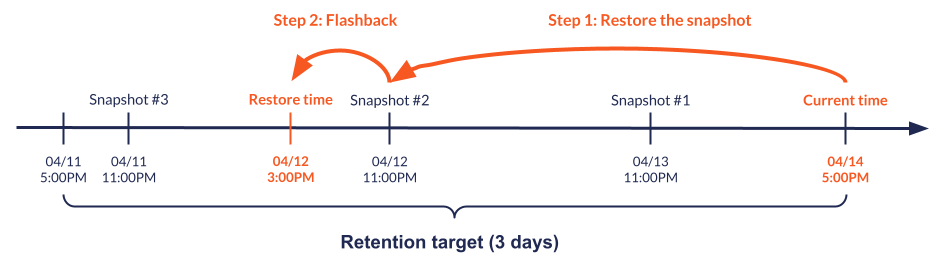
Flashback / history retention: YugabyteDB retains recent versions of data for a configurable period so the database can be read or rewound to any microsecond in that window. The default history retention is controlled by the history retention interval flag.
-
Periodic distributed snapshots: Distributed snapshots capture a lightweight copy of database data files. A snapshot schedule takes snapshots periodically and retains them for a configured duration, extending the continuous history window beyond a single flashback interval.
For example, if your overall retention target is three days, you can take snapshots daily, and retain each for three days. That configuration keeps a continuous change history for the last three days. When you rewind or restore to a point in time, YugabyteDB selects the closest suitable snapshot and uses flashback in that snapshot.
Operational considerations
Enabling PITR impacts both disk consumption and performance. Keep in mind the following:
- Retaining more snapshots, or retaining snapshots for longer durations, increases storage consumption but has no impact on database performance. The actual overhead depends on the workload; estimate it by running tests based on your applications.
- Specifying a lower snapshot interval (particularly below 24 hours) can allow the database to reduce its internal history retention period. That can improve performance by allowing more frequent compaction and reducing DocDB scan times.
When PITR is enabled for a database or keyspace, the per-database retention period is the maximum of the global history retention period and the snapshot interval specified for that schedule.